



Sixteen New Free Camera and lens Tools for Filmmakers: Storage and Optics Maths, Now Easily Sorted
If like me you have ever stared at a spec sheet trying to figure out whether a media storage card will actually get you through a full day shooting 4K footage, or squinted at a lens chart trying to remember what f/ stop a T4 cine lens is, then these two pages with 16 calculator tools are for you.
Cinescopophilia has published two calculator hubs: the Camera Recording File Size Calculator and the Cinematography & Optics Calculators. Between them there are sixteen tools, all built around real manufacturer data rather than rough guesswork, and all free for you to use.
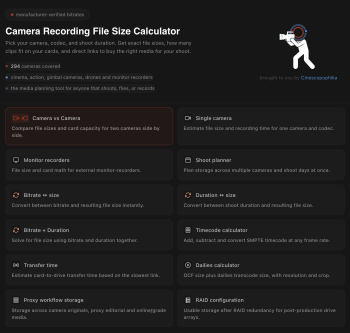
Here’s a quick walkthrough of some of the camera calculator and optic tools that I use.
Camera vs Camera
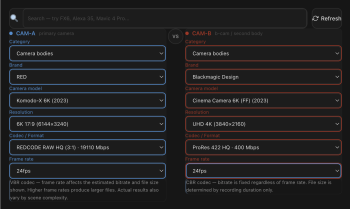
Choosing between two bodies usually comes down to a spreadsheet in your head: this camera shoots ProRes at this bitrate, that one shoots RAW at some multiple of that, and somehow you’re supposed to know which one eats your cards faster. Camera vs Camera puts two cameras side by side, lets you pick resolution, codec, and frame rate for each, and shows you the file size and card burn rate directly compared. It’s the tool for the moment you’re deciding what to rent, buy, or bring on a job, before you’ve committed to anything. Plus it helps to work out side by side the same camera, which recording mode best suits the shoots need.
Dailies Calculator
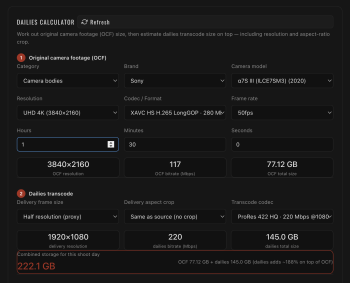
Dailies day is where storage plans quietly fall apart. You shot the footage, but now you need proxies, backups, and delivery copies, and everyone forgets that the original file size was only the start. This calculator adds up your total footage across a shoot day and factors in transcodes, backup copies, and proxy versions, so you know the real storage footprint you’re dealing with before you’re standing in a rundown motel room or the data wrangling tent at 11pm wondering where the extra terabyte went.
Transfer Time Calculator
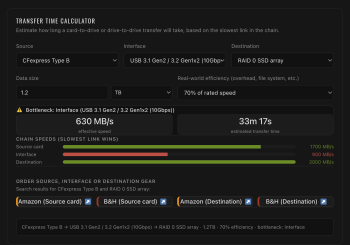
Nobody plans a shoot day around how long it takes to copy footage off cards, and then everybody’s late because of it. This one takes your total footage size and your transfer speed (USB, Thunderbolt, network, whatever you’re working with) and tells you, honestly, how long the offload is going to take. Useful for wrap planning, useful for knowing whether you need a faster reader, and useful for setting expectations with a DIT who’s about to be there a while.
Bitrate ↔ Size Calculator
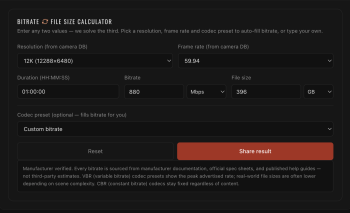
The most direct question in this whole toolkit: given a bitrate and a duration, how big is the file? Or flip it around: given a card size, how much can I actually record? It’s the calculation everyone does in their head badly, now done properly, instantly, and without the “wait, is that megabits or megabytes” moment that catches everyone out at least once.
Shoot Planner – My Favourite Tool To Use
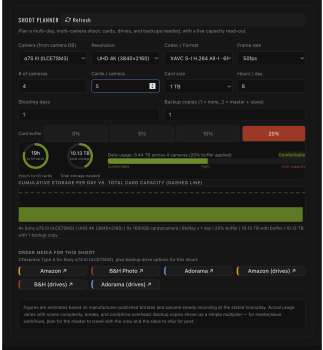
This is the tool that ties the others together. Instead of calculating one number at a time, Shoot Planner takes your whole shoot: camera, codec, resolution, estimated shoot duration, and gives you a full picture of what you need to bring. Card count, total storage, backup requirements, all in one pass, with clear status indicators so you can see at a glance whether your plan is solid or you’re cutting it close. If you only bookmark one tool from either page, make it this one. It’s built for the planning conversation that happens before a shoot, not the panic that happens during one, or the shouting match after one.
Also on the storage page
Rounding out the storage calculator: a Single Camera calculator for quick one-camera storage maths, a Monitor Recorders tool for on-camera recorder file sizes, a Duration ↔ Size calculator (the reverse-direction sibling of Bitrate ↔ Size), a combined Bitrate + Duration tool, a Timecode calculator for drop-frame and non-drop-frame conversions, a Proxy Workflow Storage calculator for planning offline/online edit storage, and a RAID Configuration calculator to work out usable capacity across RAID 0, 1, 5, 6, 10, and 50.
Cinematography & Optics Calculators
The second page is all about framing, depth of field, and exposure maths, the stuff that determines what your shot actually looks like rather than how big the file is.
Aspect Ratio Calculator

Use the reference photo image or upload your own reference photo, pick a target aspect ratio, and see exactly how your frame gets cropped before you’re on set trying to explain it to a director with your hands. It also generates full resolution tables for every common ratio, so if you need to know what 2.39:1 looks like at a specific horizontal resolution, it’s right there. Anything uploaded is actually done only on your computer. Your data does not leave the tool and page you are working on.
Depth of Field Calculator
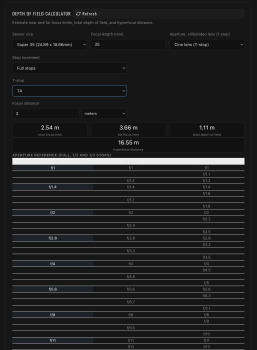
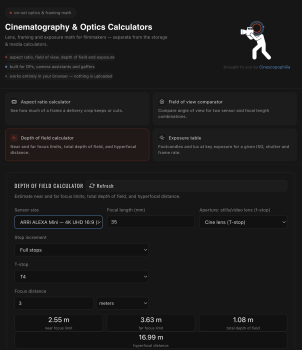
This is the one calculator tool with the most work behind it. Real depth of field maths depends on your sensor size, focal length, aperture, and focus distance, and we built this one properly: full/half/third-stop aperture ranges, a reference table showing exactly where each stop sits, and a visual iris diagram so you can see the physical relationship between stop and blade opening. Critically, it handles cine lenses correctly. A T4 does not behave like an f4. This calculator works at converting T-stops to their real effective f-number. If you shoot on cine glass, this is the depth of field calculator that finally gets the maths right.
Field of View Comparator
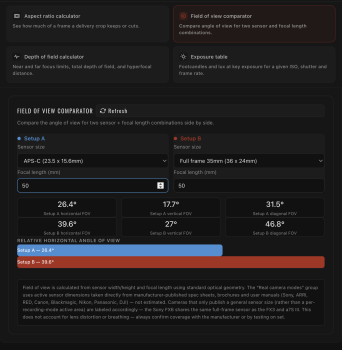
Line up two setups side by side, sensor size and focal length for each, and see the actual field of view difference between them, in degrees and visually. This one has real teeth: it includes a manufacturer-verified database of over 160 actual camera sensor modes, from full-frame cinema cameras down to Super 35 crops, drone sensors, and everything in between, so you’re comparing real hardware, not generic sensor categories.
ISO, shutter, frame rate, and aperture, cross-referenced into a clean exposure table. Real camera ISOs (including extended ranges), real frame rates, and both shutter angle and shutter speed inputs, so it matches how you actually think on set rather than forcing you into one convention.
Everything on both tool pages pulls from manufacturer-published specs wherever possible, not third-party estimates. Where a figure genuinely isn’t published anywhere (this happens with a handful of consumer drones and action cameras), it’s clearly labeled as an estimate rather than presented as fact.
Enjoy and bookmark whichever tool solves today’s problem. Because between the two pages, there’s a good chance one of the tools solves tomorrow’s issues.